
Overview of Online Research and Database Navigation
Overview of Online Research and Database Navigation
This page provides essential reading material and resources needed to effectively search for information online, navigate academic databases such as PubMed and CINAHL, perform keyword search strategies, and use APA citation of scholarly sources. Mastering these techniques is crucial for academic success and information literacy. After reading this material, view the other Moodle Pages available on the Online Navigation and Database page (also linked throughout this one). You will need these reading materials to successfully complete the Database Navigation Assignment and Digital Skills Quiz.
Fundamentals of Online Research
Online research is an essential academic and professional skill. Whether you're completing a class assignment or researching for real-world applications, knowing how to search, evaluate, and use information effectively will save time and ensure credibility. Online research involves using the internet to locate information, data, and scholarly sources. It includes general search tools like Google and specialized academic databases like PubMed and Google Scholar. Library catalogs, databases, and websites are considered to be informational retrieval resources.
Choosing the Right Source
Not all online information is created equal. Learning to identify credible and reliable sources is crucial for academic integrity. There are certain elements that you will need to keep in mind when evaluating sources. Use the CRAAP Test to evaluate sources:
- Currency – Is the information up to date?
- Relevance – Does it meet your needs?
- Authority – Who is the author and what are their credentials?
- Accuracy – Is the information supported by evidence?
- Purpose – Why was this published (inform, persuade, sell)?
Download the CRAAP Checklistto evaluate your sources.
What is a Database?
A library database is an organized collection of electronic information that allows you to search for a particular topic, article, or book in a variety of ways (e.g., keyword, subject, author, title).
All academic libraries (libraries exclusively for students and faculty of colleges and universities) subscribe (pay large sums of money on an annual basis) to research databases in order to give students and faculty access to huge amounts of information. Some of this information is in the form of e-books, but it also includes periodical publications (those that publish a new issue every day, week, month, or year). Periodical publications include newspapers, magazines, and scholarly or academic journals. Many of these types of publications are unavailable on the "free" or "open" Web (i.e. through Google or Bing), but as a tuition-paying student, databases give you full text access to thousands of costly publications.
Watch this video to learn more about databases.
Differences Between Databases and Search Engines
For a quick overview… Google, Bing, and Yahoo! are not databases. They are part of the "surface web," which indexes, or has access to, less than 10% of what's available online. There is so much more to the world wide web than Google!
Rather, Google, Bing, Yahoo!, etc., are robust and sophisticated search engines that deliver quick results. They point to information available on the web but don't always give you access. Most of the time, these results are less organized and may or may not directly apply to your needs. Search engines quickly look through words on web pages and by the use of search words (and ranking status) offer you links to other web pages. In essence, a search engine merely points you to possible information, which may or may not be available for free.
Databases, on the other hand, are essential to the researcher because they are designed to deliver intelligently organized results. Databases are part of the "deep web." Information is stored, not just linked to, in databases by the use of subject headings that an author or editor has given to a set of documents. You can search by keywords as well, but tapping into or figuring out the controlled vocabulary or subject terms that the database uses to organize the information it holds can be very helpful. Databases are about access, and you can think of them as storehouses of information that colleges and companies subscribe to.
You may have been using Google Scholar
to find scholarly sources. Google Scholar is a good starting point to
search for information, but it works privately with publishers to make
materials available. This means you cannot rely on unbiased representation of
scholarly works, and you will never obtain a comprehensive overview of
scholarly materials on the topic by using only Google Scholar.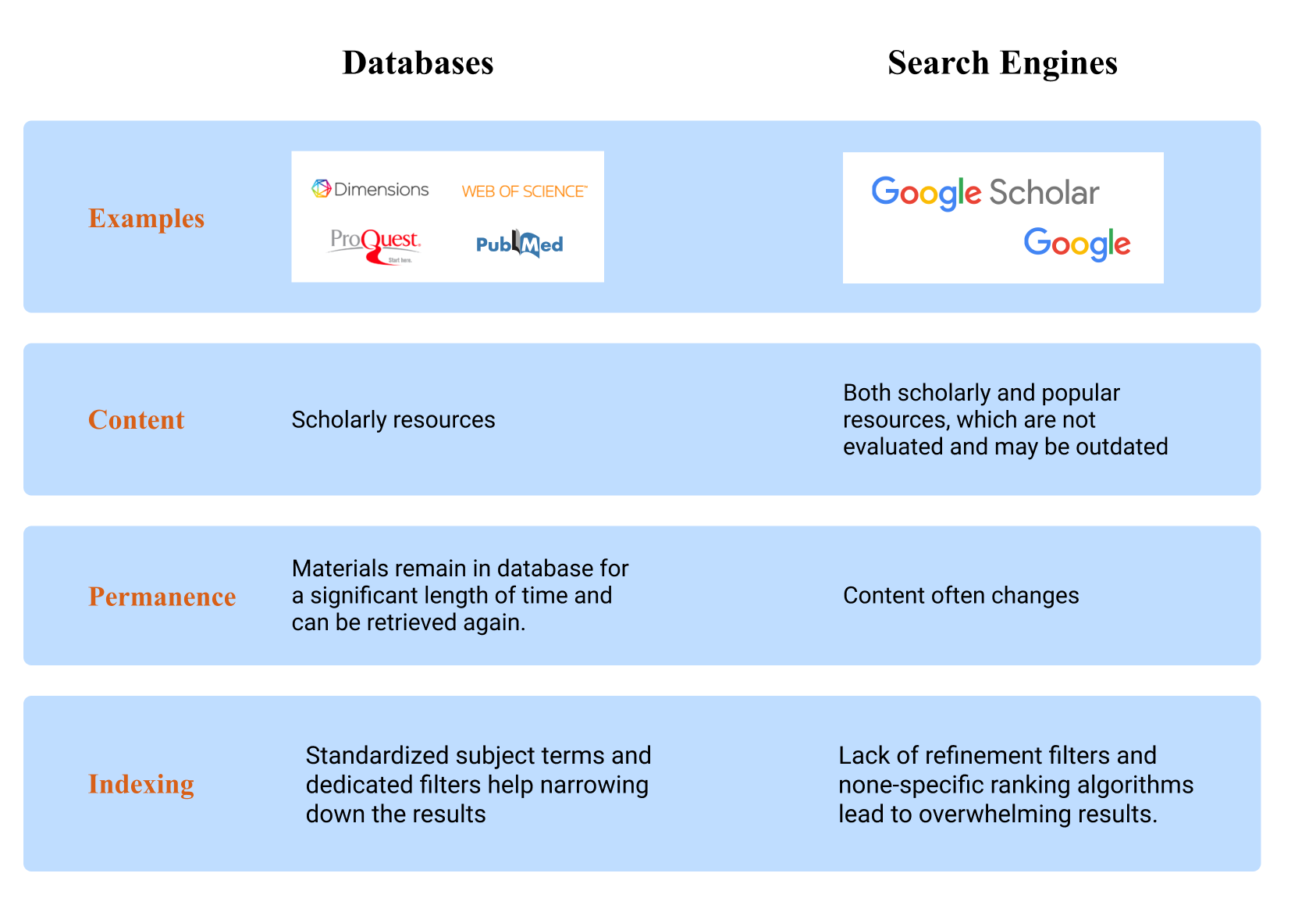
Finding Databases
Databases can be general and interdisciplinary (multi-subject).
Multi-subject databases search across multiple subjects or disciplines at once and can be a good place to start if your research topic is interdisciplinary. Multi-subject databases are also usually the best place to start if you are not sure which subject your research fits. Examples of multi-subject databases include Academic Search Complete, Dimensions Plus, Web of Science, and ProQuest.



Subject databases focus on specific disciplines. Use them when you are researching a particular topic (for example, PubMed is for biomedical and health sciences literature) or when you are looking for a particular type of information (for example, Protein Data Bank (PDB) is a database of macromolecular structures). Examples of comprehensive Chemistry databases are SciFinder and Reaxys, while CINAHL is considered the premier nursing database.
To learn more about PubMed:
- View the Moodle Page for an Introduction to PubMed
To learn more about the CINAHL Database:
- View the Moodle Page on the CINAHL Database
You will need to use either the PubMed or CINAHL database for the Database Assignment.
- Please view this Moodle Page for a Database Navigation Guided Tutorial
Which Databases can I use for Science and Chemistry Research?
For Biomedical and Health Sciences research - use PubMed, but know that it has a limited (strictly biomedical) scope. Examples of PubMed search keywords are: receptors, enzymes, diseases, patient treatment plans, clinical trials.
For Chemistry research - use SciFinder and Reaxys. Similar to general databases, both are searchable by author, journal name, topic, and publication year. Additionally, one can search by CAS Registry Number (a unique identifier for a chemical compound), chemical formula, chemical structure, and properties.
SciFinder is the most comprehensive chemistry database. It is a core research tool for chemistry, biochemistry, chemical engineering, materials science, nanotechnology, physics, environmental science and other science and engineering disciplines. Examples of SciFinder search keywords are: molecules, reactions, synthesis plan, drug development. Reaxys is similar in scope but different in interface and filters for results refinement.
Database Search Strategy
You've probably been using Google, Amazon, Netflix, or other search engines for a long time. Think about your search process for a moment. You are probably using a search strategy to find the information you need.
Similarly, one needs a search strategy when trying to locate academic research.
Boolean Operators
"Boolean operators" -- also referred to as "Boolean logic" or "Boolean searching" -- can be used in many of our research databases. Using Boolean operators can help databases give you more focused, relevant results. You will get some practice using these tools in this week's homework, so let's take a closer look.
“Boolean” is usually associated with algebraic logic. But librarians and other researchers use Boolean operators in databases to try to drill down to the handful of useful articles in a database that might have 10 million not-so-useful articles in it.
Watch a video on how Boolean operators work in databases.
View the Moodle Page for Tips on Boolean Operators
In short, Boolean operators are built-in tools within each database -- and even in search engines like Google! -- that allow you to broaden or narrow your search. Boolean searching involves using the built-in operators AND, OR, NOT to combine search terms in a database.
- AND = used to combine separate topics or concepts together, like "violence" AND "video games"
- OR = used when you need synonyms or similar words used to describe a similar topic or concept, like searching for either the phrase "capital punishment" OR "death penalty" in the same search
- NOT = eliminates words in a search, like "world wide web" NOT spiders
The image below shows the built-in Boolean operators and shows a search in the Academic Search Complete database. Let's say you're searching for information about childhood diabetes and the connection with junk food. You might try searching using the Boolean AND and OR in a search that looks like this:
"childhood diabetes" OR "type 1 diabetes"
AND ("junk food" OR "fast
food")
And here's what that search looks like in the Academic Search Complete database:

To learn more about Boolean Operators:
-
View the Moodle Page for Tips on Boolean Operators
Bonus Search Tips
- Bonus search tip #1: Why put quotation marks around all those phrases, like "junk food"? That way, those two words, junk and food, are searched together as a phrase, rather than as separate words. This search tip works on almost every library database, as well as search engines.
- Bonus search tip #2: Do you have to capitalize the Boolean operators of AND, OR, and NOT? Usually, the answer is yes (but it can depend on the specific database). The reason for why they are usually capitalized is that the Boolean operators act as codes, so when the words are capitalized, the computer knows to use them as codes and not to search for the actual words of and, or, and not. Automatically capitalize AND, OR, and NOT if using them in a search, as that also visually helps to separate what you are searching for and keep things straight.
In Academic Search Complete -- a database which houses newspaper articles, magazine articles, and journal articles -- you will see that all of your searches will likely make use of one of more of the boxes shown in the image above. Using this kind of advanced search and combining search terms is the best way to narrow a topic and find information in these structured databases. Finding the right words, called "keywords" or "search terms," can be a challenge, but once you learn how to use these tools, the search just becomes a normal part of the research process.
What are Keywords?

A search strategy operates around keywords. Keywords are 2 or 3 nouns that represent the research topic. Places, people, time periods, concepts, and ideas are common types of keywords. Creating a list of keywords before searching in a library database will help in developing a successful search strategy.
A challenge when searching is that different authors will often describe a similar concept or idea using slightly different words. A strategy that can help is brainstorming synonyms or similar terms, or looking at index (subject) terms used by a database or a journal article.
Next, you will see how to find the best keywords for your search strategy.
Tip 1: Look at Keywords within the Research Article.
Let's say you have been given an article to read about one class of chemical compounds that bind to the dopamine receptor D3 and thus block an uptake of dopamine. Note that a list of useful keywords is provided within the article. You can search for "keywords" or look at the beginning of an article (as in example below), at the end of an article or in Footnotes.

Tip 2: Read an Abstract
What if keywords are not listed anywhere in the article?
In this case, scan the abstract to identify words that are used to describe the concept. An abstract is a highlight of the whole article; it uses a keywords-rich vocabulary that allows the reader to immediately assign the article to the specific sub-field. In the article below, the underlined words would be the keywords: antagonist, agonist modulators, substance abuse, acylaminobutylpiperazines, and selective D3R ligands.

Tip 3: Look at index terms that the database is using
Finally, search the database and take a look at index terms used by the database.
Even though we searched for "drug addiction", the database indexed it as "substance-related disorders," which suggests that it would be best to search for "substance-related disorders" or perhaps "substance disorder."

How do you refine your search?
Searching for a keyword may lead to thousands of results, especially when the keyword was defined broadly. Those results are usually sorted out based on Relevance or Best Match (highest relevance on top). You can alternatively Sort by:
- Publication year - the year when the paper was published
- Number of citations - the number of papers that list the selected paper in their bibliography
- Author name - the name of the first author
- Journal name - the name of the journal where the paper was published
Learn more about the search refinement in ProQuest:
It is often recommended to do a broader search and later refine your results further using filters. All library databases will allow you to refine, narrow, or filter your results.
Common filters include:
- Publication date - allows selecting recent publications or publications of a specific time period
- Source type - allows selecting a specific document type, for example:
- review articles - when one wants to get a general overview on the topic
- journal articles - when one is looking for experimental details or a specific article
- clinical studies - when one is looking for clinical studies
- Publication title - allows selecting a specific journal
- Language - allows selecting a publication language
- Subject or index terms - allows selecting a specific topic pre-defined by a database
- Text availability - allows selecting only those sources that have full text available. Note, that at many colleges and universities, you will be able to access the full text of many sources. To make sure full text accessibility is correctly displayed in the database, please access database from your school’s homepage
Citing Your Sources
Proper citation is a critical
part of the research process. It gives credit to authors and allows others to
locate your sources. In academic writing, common citation styles include APA,
MLA, and Chicago.
You will be required to provide APA Citations in the Database Assignment. To learn how to properly format your sources:
- View the Moodle Page What are Citations? Explained
Organizing your research
Finding and organizing your research articles and notes is a key to a successful research paper. Use one of these strategies to help organize your information. Choose the strategy that works best for you!
Consider the following tools for organizing your notes:
Google Keep
Students are not always aware of one of Google’s most helpful tools: Google Keep. Google Keep is a system of online sticky notes. These notes are shareable, searchable, and taggable, making them very useful for research and projects. They integrate beautifully with google docs to help you organize your research and take notes.
Good Old-Fashioned Index Cards
Feel free to bring them in and use paper index cards to help you organize your research. If hard copy paper works best for you, go for it! Notecards are a favorite among many researchers. Make sure you have a system in place for how to organize the information on the cards as well as how to organize the cards themselves.
This online tool organizes your research into individual cards. You can provide notes, links to sources, and images within each expandable, electronic notecard.
Consider a citation manager for organizing your research articles:
Citation management software helps you:
- Organize references, PDFs, and images
- Take notes on references and PDFs
- Share references and collaborate on projects with colleagues
- Format bibliographies and in-text citations in hundreds of citations styles.
Review this research guide on Citation Management and choose a citation management software that works for you.
Attributions:
All content was adapted from a resource on Canvas Commons “Navigating Science Databases” by University of Michigan - Ann Arbor and is licensed under a CC BY-NC 4.0 license unless otherwise noted.
Additional Resources:
Boolean Operators:
This content was adapted from a resource on Canvas Commons “Introduction to Research” by Tacoma Community College Library is licensed under a CC BY-NC 4.0 license.
Boolean Operators video source: SanJac Library Video Help. (2014). How do Databases Work? Keywords and Boolean Logic [Video]. YouTube.
Background Colour
Font Face
Font Kerning
Font Size
Image Visibility
Letter Spacing
Line Height
Link Highlight
Text Colour